win95, the free Windows 95 light theme, now installs in Cursor, VSCodium and Windsurf as well as VS Code. v2.0.1 puts it on Open VSX, which is where those editors actually install extensions.
You get a silver-gray #C0C0C0 editor, a navy #00007F activity bar and a teal #018283 status bar. v2.0.0 retuned the syntax colors to stay readable on that gray. Patch to v2.0.1.
Table of Contents
- What you get
- How to install and activate it
- How v2.0.0 made the palette readable
- How v2.0.1 reached Cursor and VSCodium
- How to override a single color
- FAQ
What you get
win95 is a color theme with the extension ID asilva.win95. It’s light only and MIT licensed. It does not boot Windows 95, play MIDI or give you Solitaire.
It paints the editor chrome in the colors that interface actually used. Syntax highlighting stays distinct enough to read Go, TypeScript, Python, Rust, HTML, CSS, JSON and Markdown on a gray background.
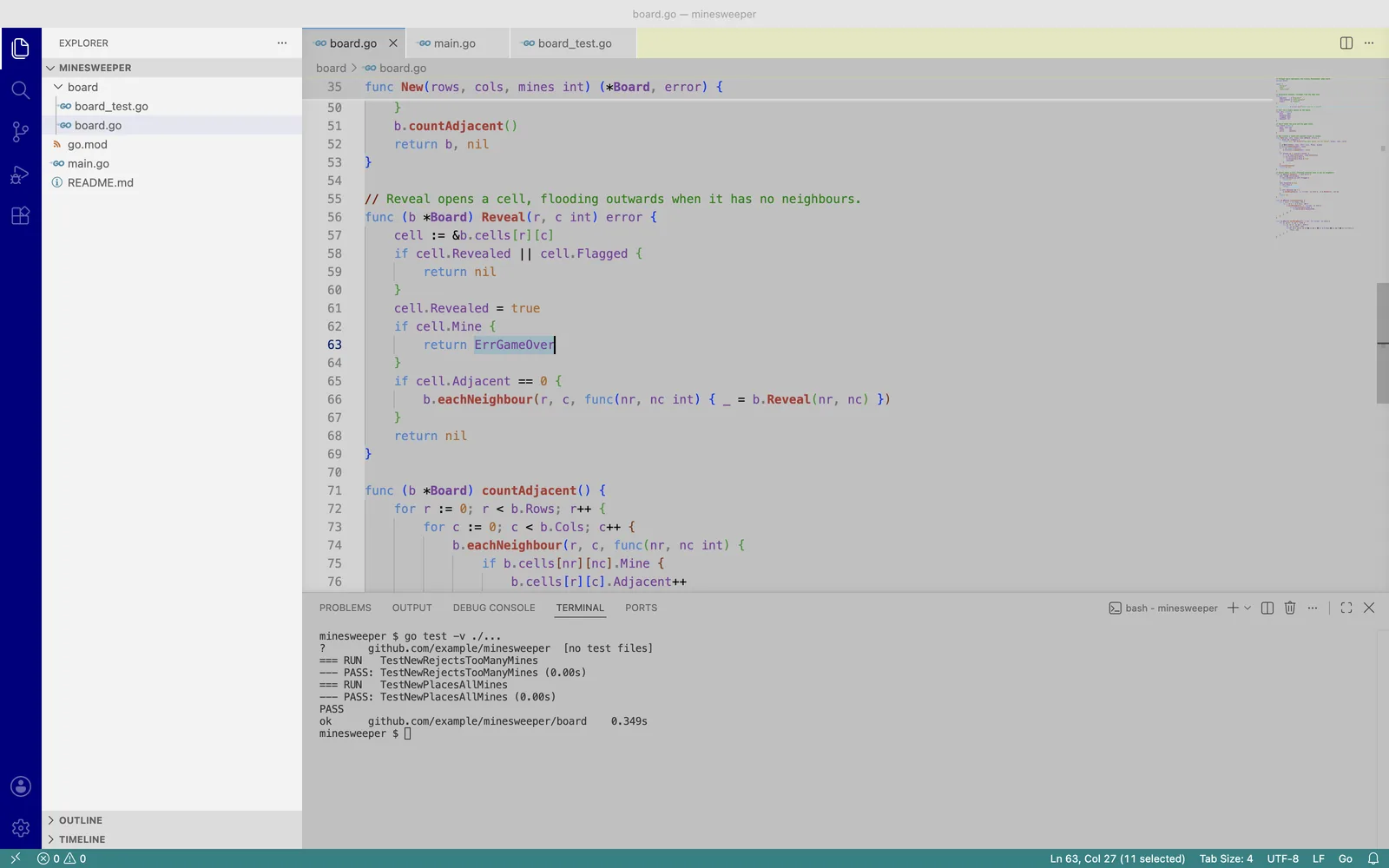
I first shipped it in 2019. The 0.x versions were closer to a novelty: VGA navy keywords, teal variables, purple numbers. Fun for a screenshot, tiring for a workday. v2 is the version I would leave on.
If you want another desktop tool from this site, Vault is the search-first file manager.
How to install and activate it
VS Code (Marketplace):
- Extensions view:
Ctrl+Shift+X(Cmd+Shift+Xon macOS), searchwin95, Install. - Quick Open:
Ctrl+P(Cmd+P) thenext install asilva.win95. - CLI:
code --install-extension asilva.win95
Cursor, VSCodium, Windsurf (Open VSX): search win95 in the Extensions view and install from there.
Then press Ctrl+K Ctrl+T (Cmd+K Cmd+T) and pick win95, or set it in settings.json:
"workbench.colorTheme": "win95"
How v2.0.0 made the palette readable
v2.0.0 was tagged 12 October 2023. The work is in the refactor for better readability commit. It keeps the Windows 95 chrome and replaces the syntax colors that fought the gray.
The interface stays period-correct:
| Element | Color |
|---|---|
| Editor background | #C0C0C0 silver gray |
| Editor text | #303030 |
| Activity bar | #00007F navy |
| Status bar | #018283 teal |
| Tab bar | #E5E6BE khaki |
| Inactive tabs, gutter | #D3D3D3 |
| Selection | #ADD8E6 light blue |
| Current line | #EFEFEF |
| Line numbers | #808080 |
| Errors / warnings / info | #FF0000 / #FFA500 / #008000 |
The syntax colors are what changed. Keywords, strings, numbers, functions and types now sit far enough apart to read. A func declaration, a string literal and a type name no longer collapse into one navy-green smear:
| Token | Color |
|---|---|
| Comments | #008000 green |
| Keywords | #4B83CD blue |
| Strings | #448C27 green |
Numbers and constants (true, nil) |
#AB6526 orange |
| Function names | #AA3731 red, bold |
| Types and classes | #7A3E9D purple, bold |
| Operators | #000000 black |
| Punctuation | #777777 gray |
v2.0.0 went to the VS Code Marketplace only. Cursor and VSCodium never saw it.
How v2.0.1 reached Cursor and VSCodium
v2.0.1 was tagged 14 September 2026. The theme JSON did not move; the distribution did. Diff: v2.0.0…v2.0.1.
VS Code installs from the Marketplace. Cursor, VSCodium and Windsurf install from Open VSX. A Marketplace-only theme is invisible in those editors’ Extensions view, so v2.0.1 publishes the same VSIX to both.
The listing is also searchable now:
displayNameiswin95 - Windows 95 Themeinstead ofwin95.- The description names the colors.
- Keywords cover
windows 95,retro,light themeand90s, the queries people type when they don’t already know the extension ID. - The README has install steps, the palette tables above and an FAQ.
A v* tag now publishes both registries in one GitHub Actions run. Changelog: CHANGELOG.md.
How to override a single color
Scope the override to this theme, so it does not leak into Dark+ the next time you switch:
"workbench.colorCustomizations": {
  "[win95]": {
    "editor.background": "#BFBFBF"
  }
},
"editor.tokenColorCustomizations": {
  "[win95]": {
    "comments": "#006400"
  }
}
To leave, pick another theme from the same Color Theme picker. Uninstall asilva.win95 from the Extensions view if you want it gone.
FAQ
Does win95 work in Cursor, VSCodium or Windsurf?
Yes, as of v2.0.1. Those editors install from Open VSX, so a Marketplace-only listing never appeared in their Extensions view. Search for win95 there, or open open-vsx.org/extension/asilva/win95. VS Code still installs from the Marketplace as before.
Is there a dark version of win95?
No. win95 is a light theme only, the same way the original Windows 95 interface was. A dark editor with 90s chrome would be a different theme, not a setting on this one.
Is win95 free?
Yes. It’s MIT licensed, with no paid tier. Source is github.com/arxdsilva/win95. Issues and pull requests go there.
How do I install the win95 theme in Cursor?
Open the Extensions view, search for win95, and install asilva.win95. Cursor pulls that listing from Open VSX. Then run Preferences: Color Theme (Cmd+K Cmd+T on macOS) and select win95, or set "workbench.colorTheme": "win95" in settings.json.