Vault is a search-first file manager that starts in 353ms and idles at about 80MB of RAM. You find files by typing, the way a command palette works. There’s one window, no sidebar and no toolbar, and everything is reachable from the keyboard.
It’s written in Go with a React front end. It deletes only to the OS trash. It also ships an MCP server, so an AI client can drive the same operations as the GUI.
Table of Contents
- What you get
- How fast it is against the spec
- How to build and run it
- Why a file manager should start with search
- How to use it from the keyboard
- How search ranks results
- Why it indexes only the folders you visit
- How to drive Vault from Claude or Cursor
- What Vault won’t do
- Known limitations
- FAQ
- Try it
What you get
Vault is a single window with three zones. A search input runs across the top. A breadcrumb strip appears once you’re inside a folder. Below it sits a virtualized list or grid. A slim rail of pinned locations runs down the left edge, and you can drag to reorder it.
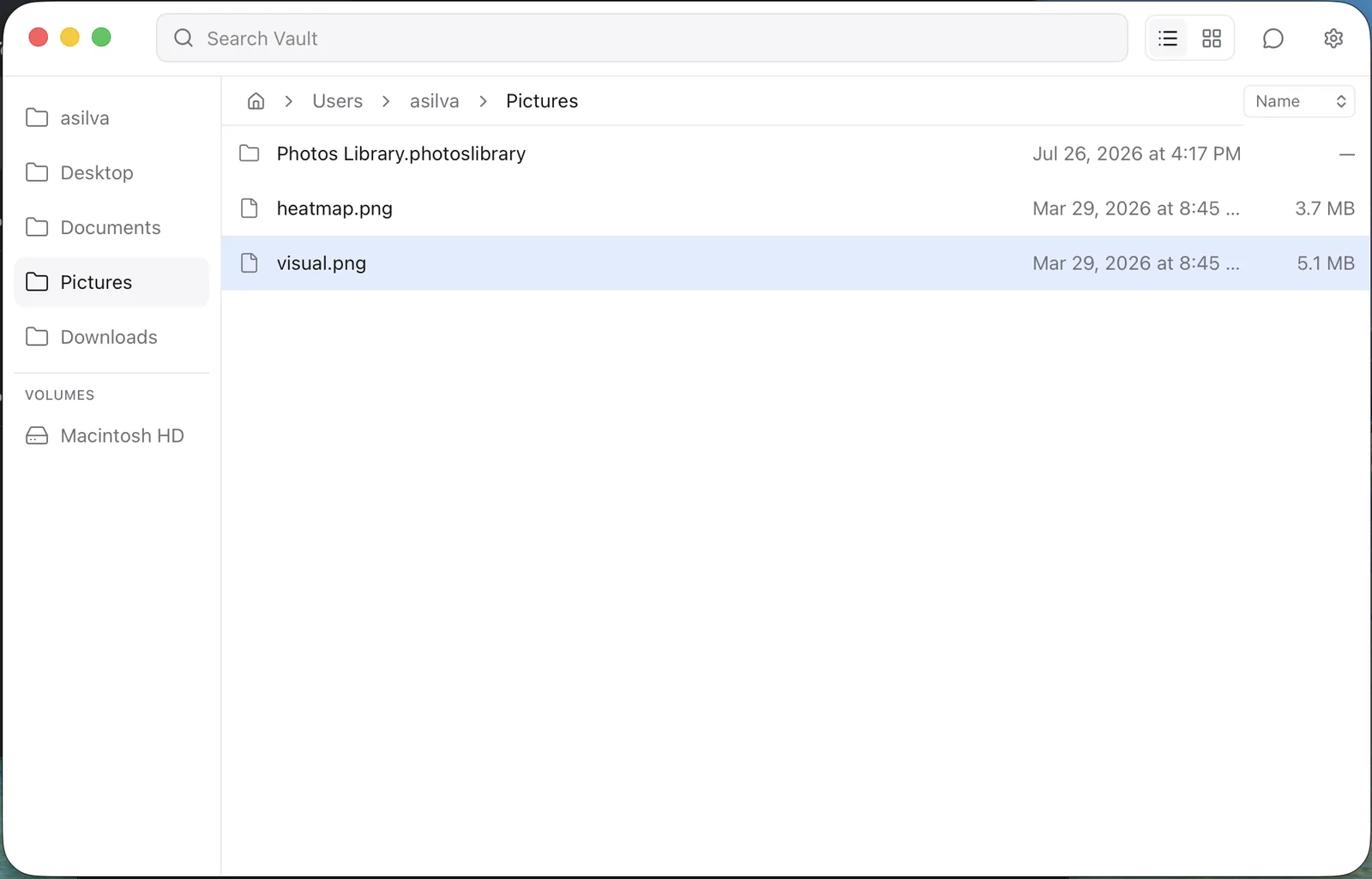
The pieces that matter day to day:
- Space opens a quick preview of images, video with playback, audio, PDF, plain text and syntax-highlighted code. Arrow keys move between files while the preview stays open.
- Cmd+K opens a command palette scoped to the current selection: rename, move with a fuzzy folder picker, copy, duplicate, copy path, new folder, compress, trash, pin.
- Deletions go only to the trash:
~/.Trashon macOS or the Recycle Bin on Windows. There is no permanent-delete path anywhere in the codebase. - Cmd+Z undoes renames and moves.
- Image thumbnails are decoded, resized and disk-cached by a bounded worker pool in Go, so the grid doesn’t stall.
- Accessibility goes past keyboard support. The list and grid are proper
listbox/optionwidgets witharia-selected. Overlays trap focus and restore it on close, async state is announced viaaria-live, andprefers-reduced-motionis respected.
Under the hood it’s Wails v3: a Go backend driving the OS’s native webview, with React, TypeScript and Tailwind on top. The Go side owns everything filesystem: directory listing, the search index, fsnotify watchers, thumbnail generation and file operations.
How fast it is against the spec
The spec set four numeric targets. Three clear comfortably, and one misses in a specific worst case.
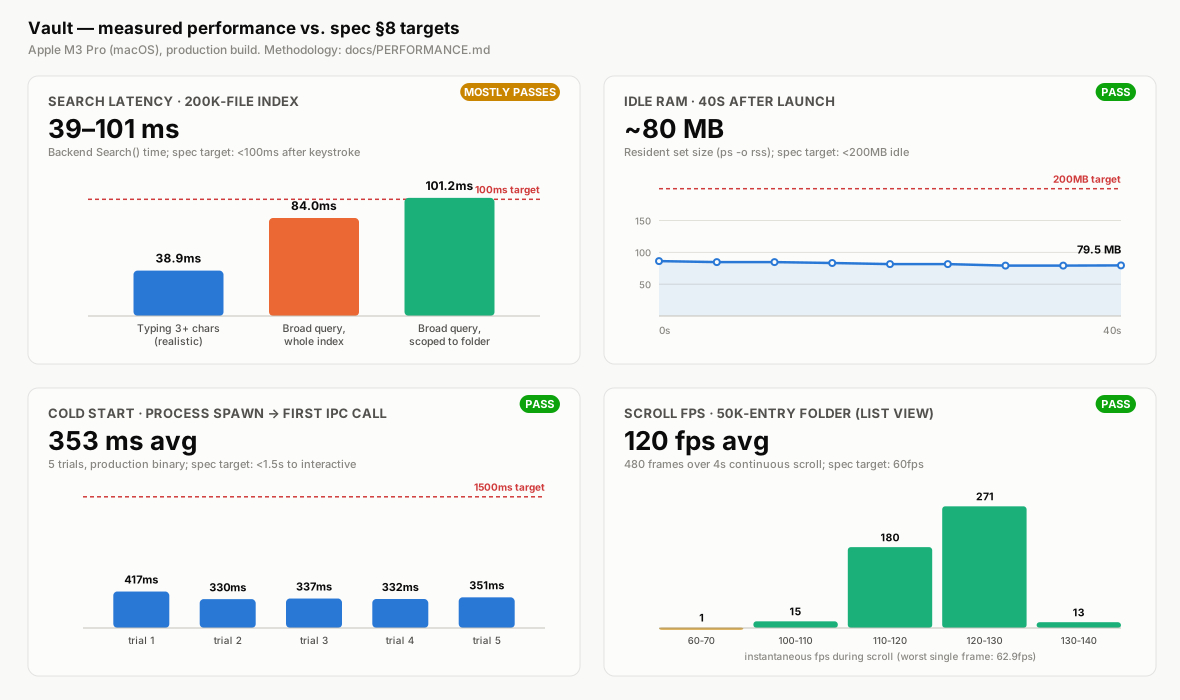
| Target | Result | Status |
|---|---|---|
| Cold start to interactive under 1.5s | 353ms avg (330 to 417ms, 5 trials) | Pass |
| Search render under 100ms at 200k files | 39ms typical, 84ms broad, 101ms broad scoped to a folder | Mostly pass |
| Scroll at 60fps with 50k entries | 120fps avg, 62.9fps worst frame, 0 frames over budget | Pass |
| Idle RAM under 200MB | ~80MB, 40s after launch | Pass |
The 101ms is the interesting one. It’s a broad query matching every entry, scoped to a subfolder, which is the worst case the ranking logic handles. It’s also the backend call only, without the 50ms input debounce and IPC overhead. So real perceived latency in that case is higher than 101ms.
The realistic case is a query narrowed by a few typed characters. That’s 39ms, and it stays inside target even after debounce and render.
It would have been easy to round that down. docs/PERFORMANCE.md says it misses instead and documents how every figure was produced. It also flags the awkward parts:
- Scroll FPS was measured on the same component mounted standalone under headed Chrome, because no automation reaches the native webview.
- The 120fps average is an artifact of a 120Hz display. The number that matters is the 62.9fps worst frame.
- None of it runs in CI. It’s a repeatable manual procedure, and it doesn’t gate regressions.
Search latency is a committed Go benchmark you can re-run yourself:
go test ./internal/core/ -run '^$' -bench 'BenchmarkSearch200k' -benchtime=10x -count=5
How to build and run it
The repo is at github.com/arxdsilva/vault, MIT licensed.
go install github.com/wailsapp/wails/v3/cmd/wails3@v3.0.0-alpha2.117
cd frontend && npm install && cd ..
wails3 dev                    # hot reload
wails3 build && ./bin/vault   # production build
Why a file manager should start with search
Finder and Explorer are built around a metaphor from 1984. Files live in nested folders, and you open them one level at a time. That made sense when a hard drive held a few thousand files.
It doesn’t match how anyone works now. You know the file is called something like invoice-march. You don’t care whether it’s in Documents/Work/2026/Q1 or Downloads.
Every editor, launcher and IDE figured this out years ago: Cmd+P in VS Code, Spotlight, Raycast. The file manager, the tool built to find files, still makes you click through a tree.
Vault inverts the default. The search bar is focused the moment the window opens. Browsing still works and is sometimes what you want, but it’s the secondary path.
How to use it from the keyboard
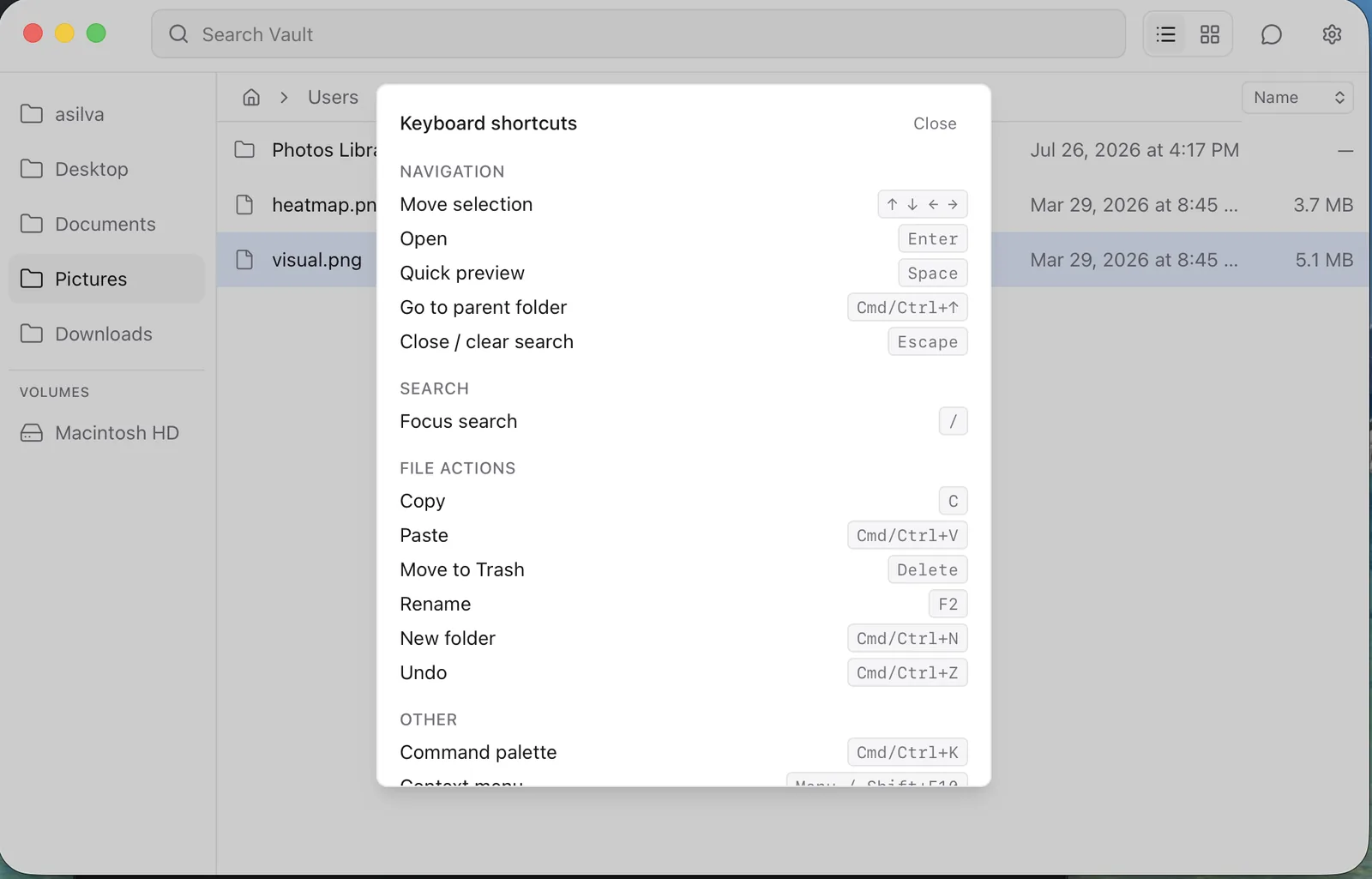
Typing anywhere searches. Esc clears and returns home. Cmd+↑ goes to the parent folder, and Space previews. Cmd+Enter on a search result reveals it in its folder without leaving the app.
There are also Gmail-style single-key shortcuts that fire whenever you’re not typing into something. / focuses search, C copies, and ? opens the shortcut help dialog.
How search ranks results
Search is a Go-side fuzzy matcher (sahilm/fuzzy) over an in-memory index. It ranks in three tiers: match quality first, then recency of access, then frequency. That’s frecency, the same idea browsers use for the address bar.
Two behaviors took real iteration.
Text files also match on their contents. Source code, markdown, config and plain text are searched up to ~200KB per file. Content matches are a plain case-insensitive substring check appended after all name matches. Name relevance is a much stronger signal than “this word appears somewhere inside the file.”
Results are scope-aware. When you’re browsing a folder, matches under it get their own share of the result limit, server-side. This fixed an annoying bug: files in the folder you were looking at got silently crowded out by higher-scoring matches elsewhere.
Results are then staged by proximity. Matches in the current folder appear first under “Searching in {folder}”. Then the scope visibly widens to each parent in turn, so you can see which scope is active.
Why it indexes only the folders you visit
The original design indexed the whole home directory at startup. That failed twice, and the second failure matters if you write Go that walks a filesystem.
The first walk never finished. It descended into ~/Library, which on my machine is 96GB of caches, Mail, application support and CoreSimulator. Search sat there reporting “index not ready yet” indefinitely.
Excluding ~/Library made the walk fail outright. macOS TCC denies access to privacy-protected folders with EPERM. Go’s os.IsPermission only recognizes EACCES. So one protected folder anywhere in the tree broke the walk. The skip logic didn’t treat its error as a permission problem and aborted the entire walk. The function’s doc comment promised unreadable subtrees would be skipped, and the error type is why they weren’t.
If you have “skip unreadable directories and continue” logic in a Go filesystem walk on macOS, test it against TCC-protected paths. It probably aborts instead.
What worked was to stop walking. The indexer now only indexes directories that have actually been visited. Visit(dir) does one non-recursive ReadDir, upserts those entries and adds a single watch. The GUI calls it whenever you navigate into a folder, and the MCP list_directory tool calls it too.
The tradeoff is real, and it’s documented. Search covers the folders you’ve opened this session, not your entire home directory from launch. Subfolders shown inside a visited folder are findable by name. Their contents aren’t indexed until you go in. Eager indexing doesn’t survive contact with a real home directory, so I took the downgrade.
How to drive Vault from Claude or Cursor
Vault exposes nine operations: list directory, search, read file, move, rename, paste-into, new folder, trash and list pinned. An MCP server (cmd/vault-mcp) hands all nine to any MCP client:
make mcp-build
./bin/vault-mcp --root ~/Projects   # optional: restrict scope (defaults to $HOME)
./bin/vault-mcp --http :8090        # optional: streamable HTTP instead of stdio
{
  "mcpServers": {
    "vault": {
      "command": "/absolute/path/to/bin/vault-mcp"
    }
  }
}
There’s also an embedded chat panel inside the app, with bring-your-own-key support for Claude or ChatGPT. Both surfaces call the same internal/core the GUI does. So there’s exactly one implementation of “move a file”, with no second backend to drift.
An agent is a different trust boundary than a human clicking around, so there are two safety defaults. Operations are confined to the home directory by default and checked for path traversal. Deletion goes to the OS trash, so the worst case for a confused agent is recoverable.
Wiring MCP into your own tools? I’ve covered the pattern in more depth for pREST’s MCP server and the surrounding plugin ecosystem.
What Vault won’t do
The non-goals are as deliberate as the features, and they’re written into the spec:
No tabs. No split panes. No cloud integrations. No network drives. No bulk metadata editing. No general third-party plugin system. No file tagging.
Each one is defensible on its own, and together they’re how you get Finder. A file manager that does twelve things adequately is worse at the one thing you open it for. The scope is “find and manipulate local files, fast,” and everything else stays outside it.
Known limitations
From docs/STATUS.md, these are the ones that would actually affect you:
- The Windows adapter has never been run. It cross-compiles clean, and that’s the entire claim, since there’s no Windows machine here to test it. “Cross-platform” describes the code, not verified behavior.
- The chat panel stores your API key in
localStoragein plaintext. Wails v3 has no keychain wrapper, and per-OS secure storage isn’t done. - There are no video thumbnails, because they need a decoder dependency the project doesn’t take. “Open With…” is disabled, and Windows packaging produces an NSIS
.exeinstead of a real.msi. - Content search holds indexed text in RAM and scans linearly per query, without an inverted index. That’s fine for a home directory, but it’s not benchmarked at 200k files that are mostly text.
- Long copies have no progress bar or cancel. Errors surface as toasts, but a 40GB move gives you nothing to watch.
It’s MIT licensed, early, and a tool I use rather than a product.
Vault’s MCP server is one of several I run. The Postgres one is compared with its alternatives in Postgres MCP servers compared.
FAQ
Why Wails instead of Electron or Tauri?
Wails v3 pairs a Go backend with the OS’s native webview, so the binary stays small. All the filesystem work (indexing, fuzzy matching, thumbnail worker pools, watchers) lives in Go, where concurrency is cheap. Idle RAM came in around 80MB against a 200MB target, which Electron would not make easy. Tauri would have been a reasonable alternative; wanting the backend in Go decided it.
Does Vault delete files permanently?
No. Every delete path goes to the OS trash: ~/.Trash on macOS, the Recycle Bin via SHFileOperationW on Windows. There is no permanent-delete implementation in the codebase. That applies to the MCP server and chat panel too, not just the GUI.
Is Vault ready to replace Finder?
On macOS it’s usable daily, which is what it was built for. On Windows the adapter compiles but has never run, so treat that as unverified. Read docs/STATUS.md before committing to it.
Does Vault search my whole home directory?
No. Search covers the folders you’ve opened this session. Subfolders inside a visited folder are findable by name, but their contents aren’t indexed until you go in.
Try it
The repo is at github.com/arxdsilva/vault, MIT licensed. The build commands are in How to build and run it.
If something breaks, especially on Windows, where I genuinely can’t test, open an issue.