loops turns a ticket into a pull request for a Go backend. Specialist AI agents research, plan, build and check each other’s work. The PR arrives with proof that each requirement works.
It’s a free plugin for Claude Code, GitHub Copilot, Codex, Cursor and Gemini CLI, with installers for four more agents. Install v0.4.1 and run your first ticket below.
Table of Contents
- What you get
- Quickstart
- The test gate, shown working
- What happens during a run
- Sized to your machine
- Other coding agents
- Your project’s rules win
- Versions and limits
- FAQ
- Links
What you get
- 17 role agents: researchers, a planner and a plan reviewer, an architect, engineers, a QA verifier and a product reviewer.
- Tickets from GitHub, GitLab, Jira, Linear or plain text:
/loops:work #42is enough. - A plan written by one agent and challenged by another before any code. Add
--approveto sign off on it yourself. - Engineers working in parallel, each in its own files, with a QA verifier per engineer.
- A hard gate: new code ships with tests, at least 70% coverage, always run with
-race. - A pull request with each acceptance criterion matched to its proof, plus an offline HTML report.
It’s for teams that already build Go backends with a coding agent. It isn’t for other languages, since the rules, roles and gates are written for Go.
Quickstart
You need a Go repository, gh or glab for tickets and PRs, and one of the supported agents. Go itself isn’t needed. On first use, the plugin downloads the loops binary from the GitHub release and checks its checksum.
Install it in Claude Code:
/plugin marketplace add arxdsilva/ai-loops
/plugin install loops@ai-loops
Then, in your Go repository:
/loops:init      # config, AGENTS.md rules, .gitignore; checks dependencies
/loops:status    # optional: adds the live status line
/loops:work #42  # a GitHub issue; or GitLab, Jira, Linear, plain text
The plugin puts loops on the agent’s shell PATH, and the installer puts it in ~/.local/bin. Either way, it reports its release:
$ loops version
loops 0.4.1
While a run works, the status line shows its phase, its agents and its gates. Here is the example from the README:
▶ #42 add-orders · Implement W1 · 4/5 lanes · QA 2✓ 1↺ · plan r2 · gates build✓ vet✓ · 87 steps · 12m
loops watch gives the same live view in a side terminal, on any platform. loops report writes the run’s HTML report.
The test gate, shown working
No pull request goes out until loops gate is green. Here it is on a small module with one new function and no tests:
// Total is the order total in cents.
func Total(lines []Line) (int, error) {
	if len(lines) == 0 {
		return 0, ErrEmpty
	}
	total := 0
	for _, l := range lines {
		total += l.PriceCents * l.Qty
	}
	return total, nil
}
$ loops gate --base main
✓ build 0.0s
✓ gofmt 0.0s
✓ vet 0.1s
✓ arch 0.0s
✓ test 0.3s
✗ coverage 0.0s
    file                            stmts covered      %  uncovered lines
    internal/domain/order/order.go      6       0    0.0  17-24
    internal/domain/order/order.go:17: new code in order.go is untested (0/6 statements)
    new code coverage 0.0% < 70%
$ echo $?
1
The gate measures only new code against your base branch. It names the uncovered lines. With two tests added, the same command passes and exits 0:
$ loops gate --base main
✓ test 1.7s
✓ coverage 0.0s
    file                            stmts covered      %  uncovered lines
    internal/domain/order/order.go      6       6  100.0
The output is trimmed. A full run also lists build, gofmt, vet and arch, plus staticcheck and govulncheck when installed.
Agents can’t skip the gate. A hook denies any go test run without -race. Another stops the lead from finishing while Go files changed since the last green gate.
What happens during a run
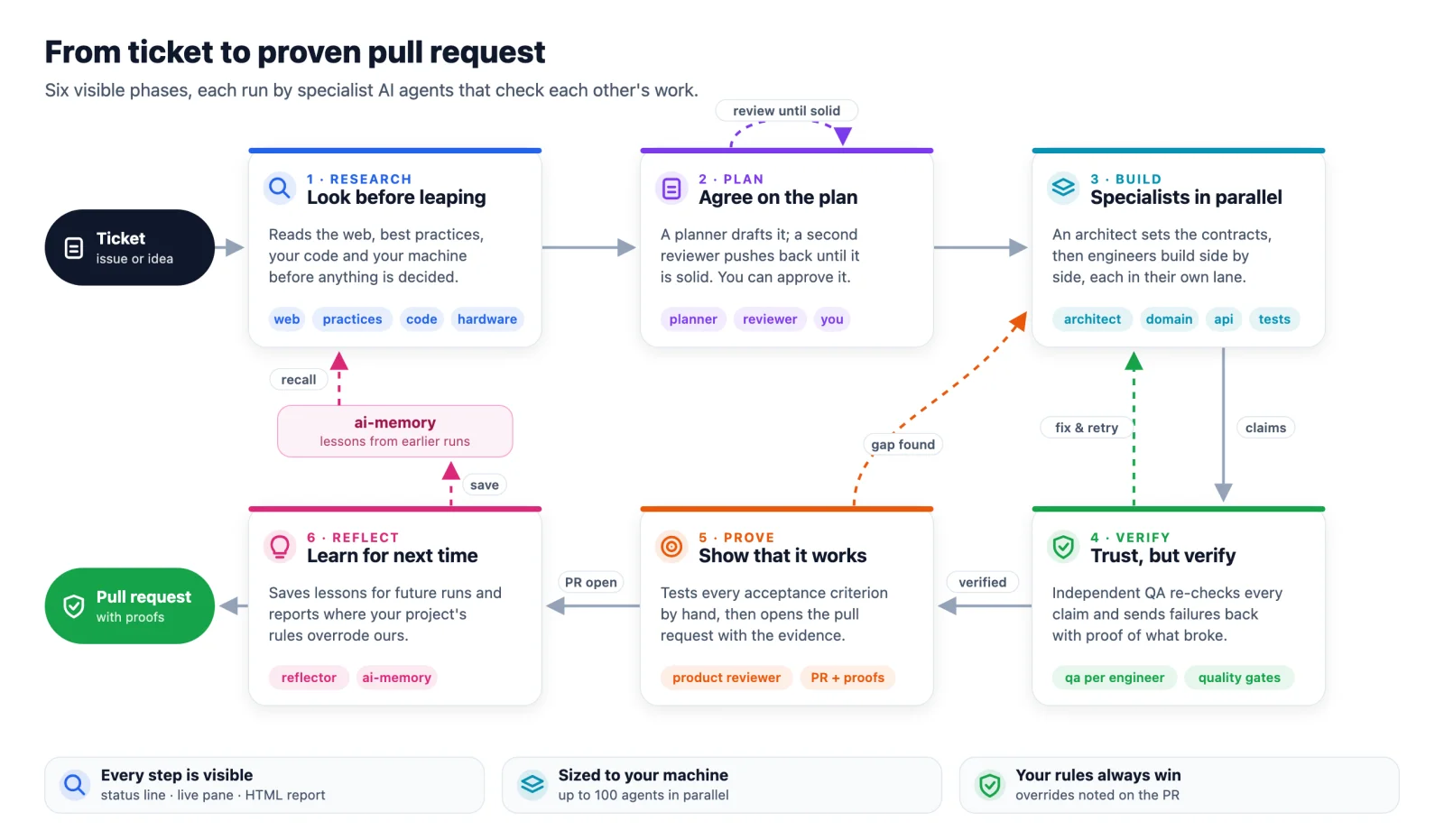
| Phase | Who | What it leaves |
|---|---|---|
| Research | web, practices, code and hardware researchers, in parallel | Short briefs with sources |
| Plan | planner and plan reviewer, until it’s approved | plan.v<N>.md and each review |
| Build | an architect first, then engineers in parallel waves | Code, tests and a claims report per engineer |
| Verify | one QA verifier per engineer | Each claim verified, or sent back with a repro |
| Prove | product reviewer | A proof per acceptance criterion, then the PR |
| Reflect | reflector | Lessons for the next run |
The architect writes the shared interfaces and stubs first, so every engineer can start against them at once. Rejected work goes back to the same engineer, with what broke and how to reproduce it. After two failed QA rounds, the role moves up one model tier.
Sized to your machine
Before planning, a researcher runs loops hw. On a 64 GB Apple Silicon Mac it printed:
$ loops hw
- OS/arch: darwin/arm64
- CPU: 12 logical, GOMAXPROCS 12
- RAM: 27.6 GiB available of 64.0 GiB
- Load (1m): 5.18

Recommendation: 20 parallel agents, 6 concurrent test runs, GOFLAGS=-p=2
Why: RAM-bound: 27.6 GiB available → 20 agents (cap 100)
The planner sizes each wave to that number, to your config cap (100 by default) and to any limit you set. loops plan check rejects a plan that goes over the cap or gives two agents the same files.
Limits are off by default. Opt in per run:
/loops:work #42 --max-agents 12 --budget research=200k,implement=2M
Other coding agents
| Agent | Install | Tier |
|---|---|---|
| Claude Code | /plugin marketplace add arxdsilva/ai-loops |
A |
| Cursor | Import arxdsilva/ai-loops from the marketplace |
A |
| GitHub Copilot | copilot plugin install arxdsilva/ai-loops |
B |
| Codex | codex plugin marketplace add arxdsilva/ai-loops, then the installer |
B |
| Gemini CLI | git clone the repo, then gemini extensions install ./ai-loops/platforms/gemini |
B |
| OpenCode | installer | B |
| Amp | installer | C |
| Windsurf, Cline | installer | D |
Tier A agents resume the same subagent after a send-back. Tier B uses subagents without resume, C uses generic subagents, and D runs solo. The installer is one line:
curl -fsSL https://raw.githubusercontent.com/arxdsilva/ai-loops/main/install.sh | sh -s -- --target opencode
Your project’s rules win
Your repository’s rules beat loops’ defaults. That covers AGENTS.md, CLAUDE.md, .cursor/rules, CONTRIBUTING, linter configs and your existing layout.
Each time an agent follows your rule over a loops rule, it logs the choice. At the end, the reflector posts those choices as one comment on the PR, so you can see where your rules applied.
Runs also clean up after themselves. Agents build with a Go cache scoped to the run, and loops deletes it at the end with any leftover binaries. Your global Go cache isn’t touched.
Versions and limits
- Install v0.4.1. Prebuilt binaries cover macOS, Linux and Windows, on amd64 and arm64. MIT licensed.
- Go backends only.
- Token budgets are measured on Claude Code, Codex and Copilot, and advisory elsewhere. The status line and live pane are Claude Code only.
- On OpenCode, hooks run through a shim, so session start, stop and agent lanes aren’t delivered.
loops checks for a newer release once a day. Turn that off with LOOPS_NO_UPDATE_CHECK=1.
FAQ
What is loops?
loops is an open source plugin for AI coding agents. It turns a ticket into a Go pull request. A team of specialist agents researches, plans, builds, verifies and proves the change.
Which coding agents does loops support?
Claude Code, Cursor, GitHub Copilot, Codex and Gemini CLI install it as a plugin. OpenCode, Amp, Windsurf and Cline use a one-line installer. Claude Code and Cursor get the most features, including resuming an agent after a send-back.
Does loops work for languages other than Go?
No. Its rules, roles and gates are written for Go backends. That includes the test gate, the architecture check and the race detector hook.
How does loops make sure the code works?
A QA agent re-checks every claim an engineer makes. loops gate then requires tested new code with at least 70% coverage under -race. Last, a product reviewer tries each acceptance criterion and attaches the proof to the PR.
Can I approve the plan before any code is written?
Yes. Run /loops:work with --approve. The run stops after the plan review and waits for your approval.
Does loops open the pull request by itself?
Yes, after every requirement has a proof. To get the PR text without pushing, add --no-pr. loops then writes pr.md and stops there.
Is loops free?
Yes. It’s MIT licensed, and the binaries are free to download.
Links
Code and docs: github.com/arxdsilva/ai-loops. Release: v0.4.1. The full workflow is in specs/WORKFLOW.md, and every role is in ROLES.md.
Reviewing what agents send you? Read Reviewing AI-Generated Pull Requests: A Staff Engineer’s Checklist and why reviewers stop reading AI-written PR descriptions.
Also from Insurgency Labs
Want to see how agent PRs change your team’s delivery? DeliveryCompass shows PR cycle time and review patterns from GitHub, with read-only access. See the DeliveryCompass overview.